
How to set up 301 redirects in PrestaShop 8 (and why .htaccess isn’t enough)
A 301 redirect tells Google and the browser that a URL has moved permanently to another one. It’s the basic tool to avoid losing rankings when an address in your store changes or disappears. Skip it and that URL returns a 404, Google eventually drops it from the index, and you lose traffic you already had.
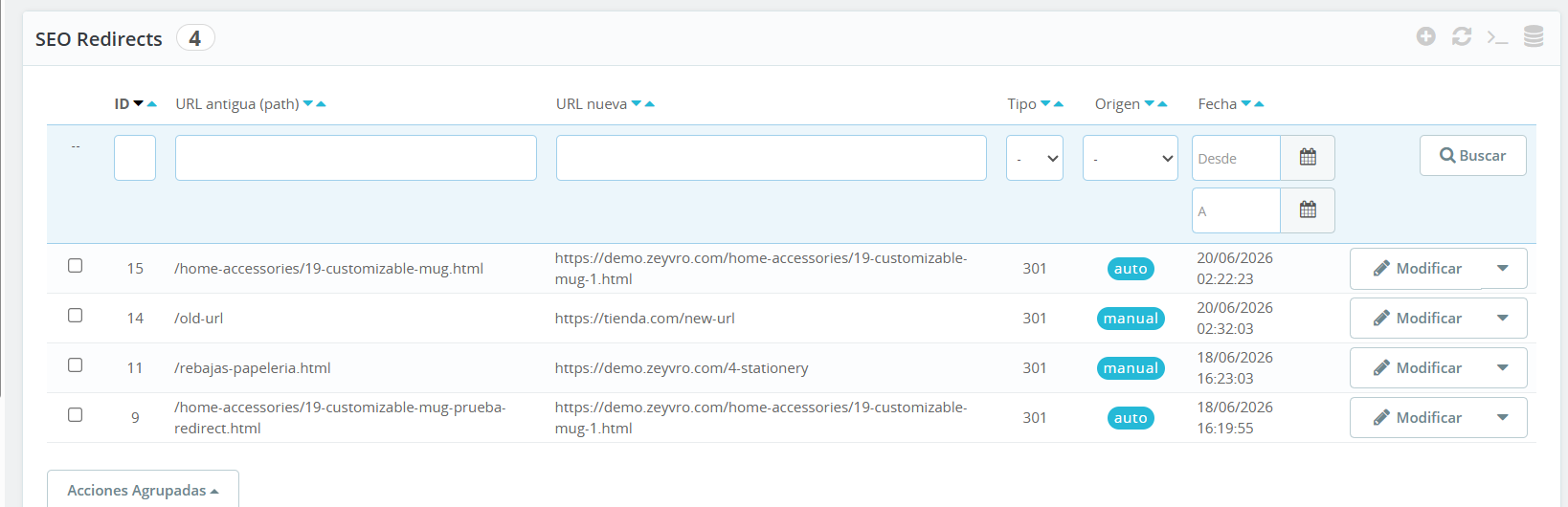
In PrestaShop 8 you have three ways to do it. Let’s cover all three — and the case almost no one handles.
What a 301 redirect is (in one line)
A permanent notice: “this page isn’t here anymore, it’s over there.” The visitor lands on the right page and Google passes the old URL’s SEO value to the new one.
Why they matter (and what’s at stake if you ignore them)
A 301 redirect looks like a minor technical detail — until a silent failure piles up for months. When you change a slug and don’t redirect, the old URL returns a 404: visitors hit an error page and search engines start dropping it from the index. The “SEO weight” that page had built up — links, authority, rankings earned over time — goes with it, because nothing passes it to the new URL. In a store where the catalogue changes and slugs get renamed often, handling this badly costs organic traffic and sales, not just one broken page. A 301 is what tells Google “this address moved permanently — carry everything the old one had over here.”
Method 1: by hand with .htaccess
You can add redirect rules directly in your server’s .htaccess. It works and needs nothing else, but it has downsides: you edit a critical file (one mistake and the site goes down), it’s awkward for many redirects, and it doesn’t detect when you change a product URL. You manage it yourself, blind.
Method 2: from the BackOffice, no file editing
Managing redirects from the PrestaShop panel is safer and easier: create, edit and delete them without touching the server. Ideal if you want control without the risk of breaking .htaccess.
The case .htaccess doesn’t cover: changing a product slug
This is the real problem. When you edit a product’s or category’s friendly URL, the old address dies right then, and you usually don’t notice until traffic drops. Neither .htaccess nor manual management warns you. The only way to keep that SEO is for something to detect the change and create the 301 for you.
FAQ
- Does a 301 redirect affect SEO?
- Yes, positively: it passes the old URL’s authority to the new one, so you don’t lose rankings.
- 301 or 302?
- 301 for permanent changes (the usual case). 302 only if temporary.
- Do I have to edit .htaccess?
- No. You can manage redirects from the PrestaShop BackOffice without touching server files.
Change URLs often? Let the 301 create itself when a slug changes → SEO Redirect for PrestaShop 8 →
Zeyvro builds PrestaShop 8 modules from a real, live store. Unobfuscated code.
See also: You changed a product URL and got a 404: how to keep your SEO · 3 ways to manage 301 redirects in PrestaShop