
No 404s and no .htaccess editing: when you change a URL, the old one returns a 301 to the new one.
The problem: change a URL and you break your SEO
Every time you edit a product or category slug in PrestaShop, the old address stops existing. Google had it indexed and other pages linked to it: now it returns a 404. Internal links break, and visitors coming from Google land on an error page instead of the product.
Worst of all: very often you don’t notice until traffic drops.
The solution: automatic slug-change detection
SEO Redirect watches URL changes on your products and categories. As soon as you save a new slug, it detects the change and creates the 301 redirect from the old address to the new one, in every language of your store.
Zero friction
You change the URL as usual. The module issues the 301.
No server access
Everything is managed from the back office, with no files to edit.
📋What’s included
- Automatic detection of slug changes on products and categories: a 301 on save.
- Manual redirects 301, 302 and 303 from the back office, no file editing.
- CSV import for migrations and redesigns. The import has no row limit.
- CSV export of all your redirects, to keep a backup or review them in a spreadsheet.
- History of the slug changes the module has turned into redirects.
- No .htaccess: everything from the panel, no server files to edit.
🧩What it also does, without you asking
- Slug suggestions. If you rename a product or a category and its URL still carries the old text, the module suggests the new URL. You decide: apply it and the 301 is created in the same click, or dismiss it and it stays as it was. You can apply or dismiss several at once, and if you prefer, switch on in Settings that they apply themselves on save (off by default).
- Chains resolved in one hop. If an already-redirected URL changes again (A → B, then B → C), the module rewrites the old rule so that A goes straight to C. No chained hops.
- Trailing slash, your choice. In strict mode,
/pageand/page/are different rules. In either mode, one rule serves both forms; handy if you come from another platform that linked both ways. - Discontinued products. Lists disabled products, or products that no longer accept orders, whose URL is still live with no redirect, and lets you send them with a 301, 302 or 303 to a category, a brand or another product, one by one or in bulk. You find the target by typing: products by name, reference, EAN13 or ID; categories and brands by name or ID.
🖥️How it works (3 steps)
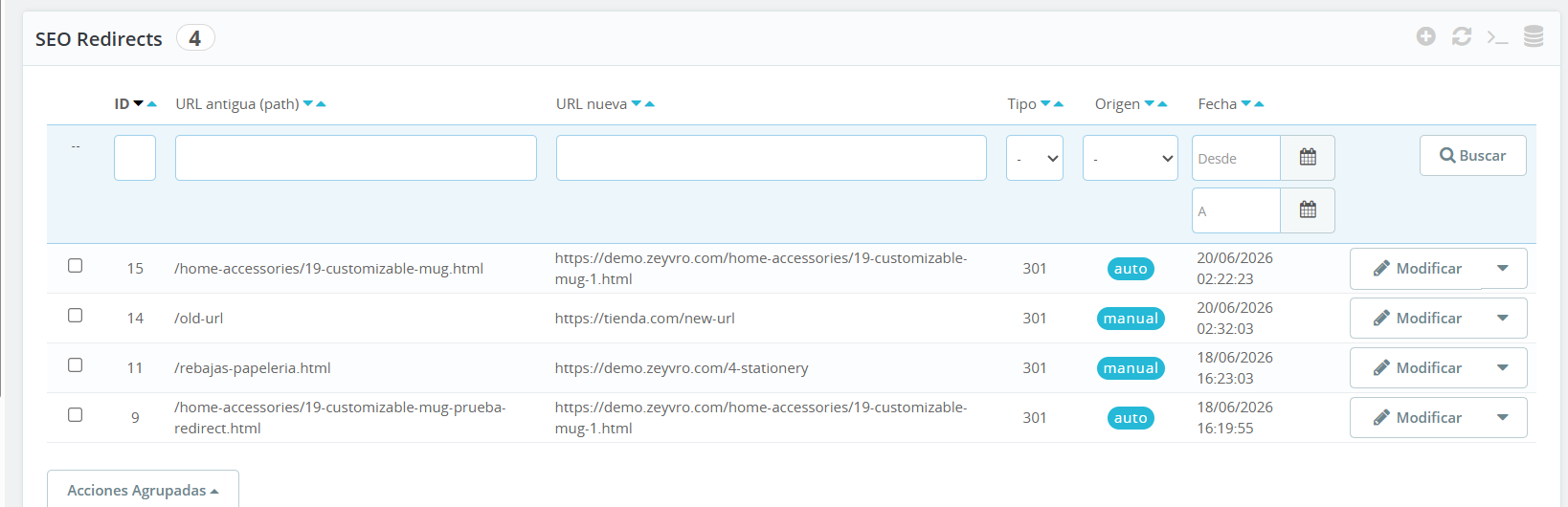
Install the module from Modules → Upload a module and you’re done: no keys, no activation. You get the full list, manual and automatic.
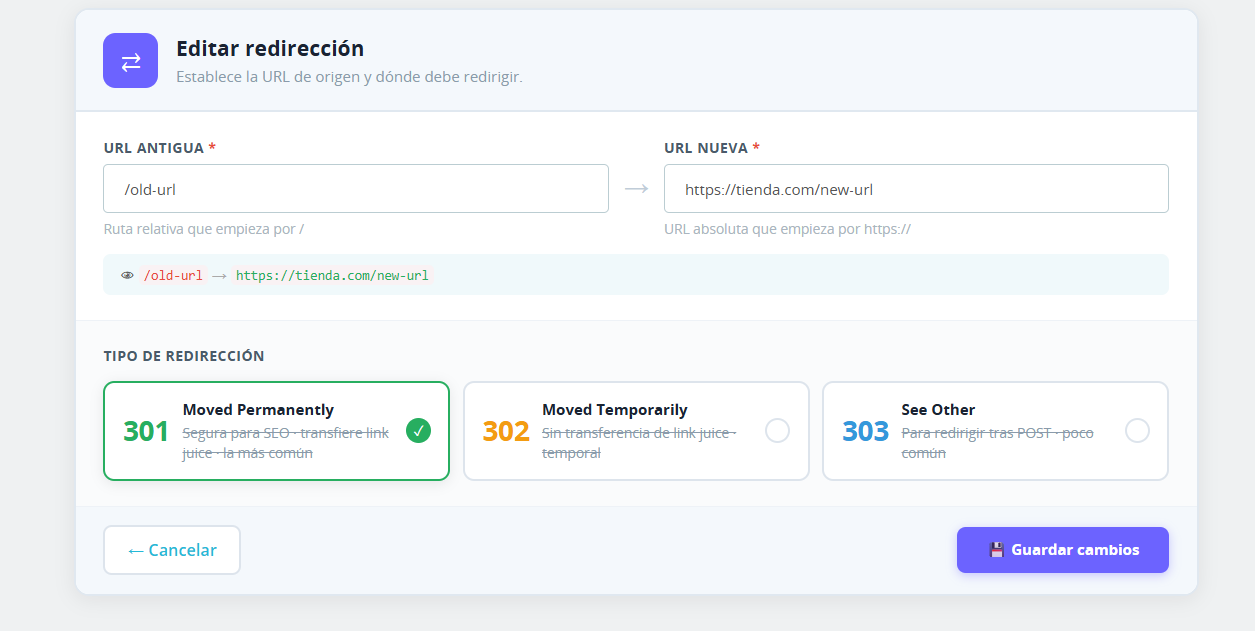
Run your store as usual. If you need to, create manual redirects (301, 302 or 303) in a couple of clicks.
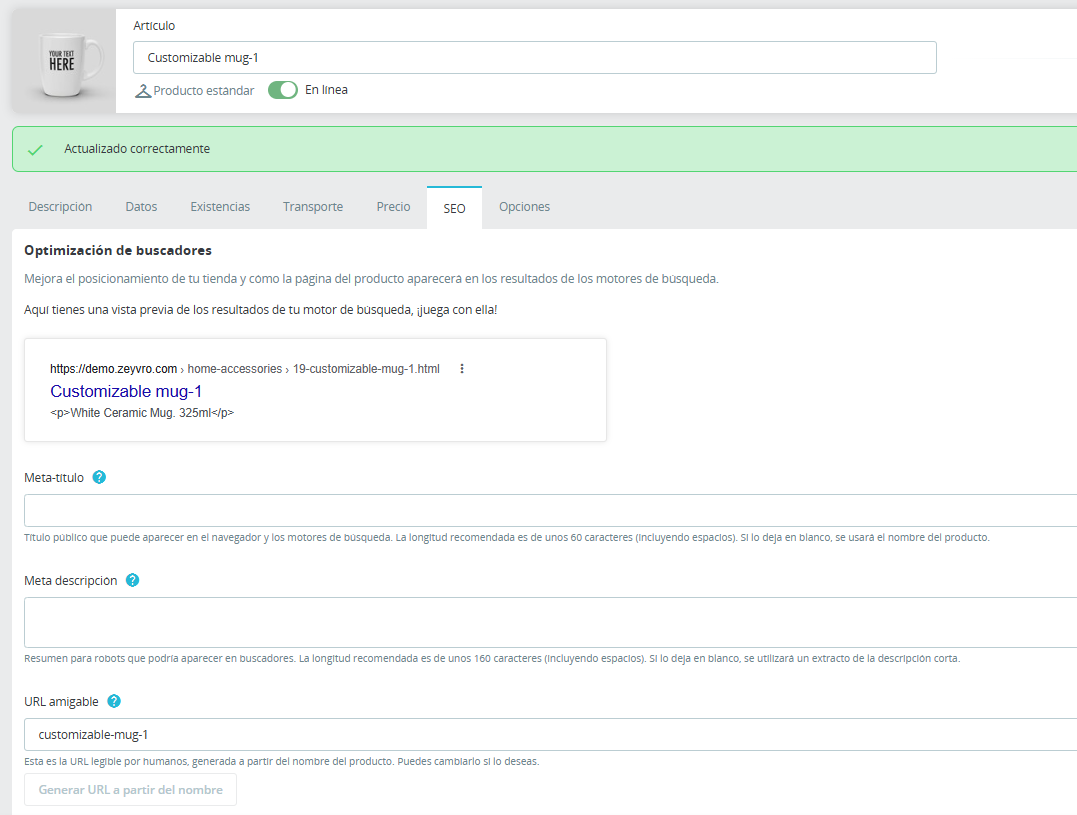
You change a slug and the module creates the 301 on its own, with nothing else to do.
⚖️Zeyvro vs doing it by hand
PrestaShop does not create a 301 when you change a URL, and the .htaccess means writing every rule on the server. Zeyvro SEO Redirect 301 does it on its own from the back office, suggests the new URL when you rename something, and sends discontinued products to their category, brand or another product.
| What you need | Zeyvro SEO Redirect 301 | PrestaShop out of the box | .htaccess by hand |
|---|---|---|---|
| 301 when a product or category URL changes | ✓ Yes, automatically | ✗ No | You write every rule |
| A → B → C chains resolved in one hop | ✓ Yes | ✗ No | You check the rules yourself |
| Suggests the new URL when you rename | ✓ Yes | ✗ No | ✗ No |
| Discontinued products to their category, brand or another product | ✓ Yes, one by one or in bulk | Disabled products only | Rule by rule |
| 404 list and a 301 in one click | ✓ Yes | ✗ No | ✗ No |
| CSV import and export | ✓ Yes | ✗ No | ✗ No |
| Change history | ✓ Yes | ✗ No | ✗ No |
| Where you manage it | Back office | — | Server (FTP or SSH) |
| Price | €59 one-time | Free | Free |
Features of version 1.8.6.
⭐Why Zeyvro
- Does exactly what it says. No filler features.
- Uninstalling does not lose your redirects: it stops redirecting, but keeps your redirects, suggestions and history in the database, in case you install it again.
- Unobfuscated code and support from the person who built it.
- Tested on PrestaShop 8.0 to 9.2: 8.0.5, 8.1.7, 8.2.6, 9.0.0, 9.1.3 and 9.2.0. Requires PHP 8.1 or later.
When you DON’T need it (straight talk)
- If you almost never change your product or category URLs.
- If your catalogue is very small and you handle the few redirects by hand without trouble.
- If you already have a redirect workflow that works for you and don’t need the automatic part.
If that’s you, save your money. If you change URLs with any regularity or you’re about to migrate, that’s when the module makes sense.
💶Price
€59 one-time
Includes updates for as long as Zeyvro maintains the module and 6 months of email support in Spanish from purchase. Secure checkout via LemonSqueezy.
Buy nowRead the full documentation · Download the user manual (PDF)
❓FAQ
How to create 301 redirects in PrestaShop 8?
PrestaShop has no redirect manager: out of the box it only redirects disabled products. For everything else there are two ways: write rules in the server’s .htaccess, or use a module that manages them from the back office. With Zeyvro SEO Redirect 301 you create them under Zeyvro → SEO Redirects (301, 302 or 303) and, when you change a product or category slug, the 301 is created automatically.
How to avoid 404 errors when changing a product URL in PrestaShop?
Redirect the old URL to the new one with a 301 at the moment of the change: without that redirect, the old URL returns a 404. You can do it by hand in the .htaccess or with a module. Zeyvro SEO Redirect 301 does it for you: when you save the new slug it creates the 301 from the old URL to the new one, in every language of your store.
Does PrestaShop automatically create redirects when a category slug changes?
No: PrestaShop does not create a permanent redirect when you change a category’s friendly URL, and the old address stops working. Zeyvro SEO Redirect 301 does: when you save the new slug, the old category URL returns a 301 to the new one. The automatic redirect covers the category URL; if your product URL format includes the category, check those URLs and, if needed, import them via CSV.
How to import 301 redirects from a CSV in PrestaShop 9?
PrestaShop’s CSV importer does not handle redirects: it imports products, categories, customers and other entities, but not redirect rules. You need a module or server rules. With Zeyvro SEO Redirect 301 you click Import CSV, choose the separator (; or ,) and each line holds old_url;new_url;type. The import has no row limit, reports how many rows were skipped as duplicates or malformed, and is tested on PrestaShop 9.0.0, 9.1.3 and 9.2.0.
Does it break my SEO if I change many URLs at once?
No. Every old URL you change gets its own 301 redirect to the new one, instead of ending in a 404. What the module does not do is measure the effect: it stores no traffic or ranking metrics; you read those in Search Console or Analytics.
Which PrestaShop versions does it work with?
It is tested on PrestaShop 8.0.5, 8.1.7, 8.2.6, 9.0.0, 9.1.3 and 9.2.0, and requires PHP 8.1 or later.
Do I have to touch the .htaccess?
No. Everything is managed from the back office; the module never asks you to edit server files.
Do I need an activation key?
No. Install the module and it works: no key, no activation, and it never contacts a validation server.
Do I lose my redirects when I update or uninstall?
No. To update, upload the new ZIP on top from Modules → Upload a module. Uninstalling does not delete them either: the tables are kept on purpose, although the module stops serving them until you install it again. The only thing you lose is your settings: Trailing slash goes back to Strict and the two Slug suggestions switches (Apply slug suggestions automatically — products and — categories) go back to No.